


Why Online Privacy Is More Complex Than You Think
How your data is tracked online is something most people rarely think about. At first glance, online privacy feels simple. Many assume that avoiding suspicious websites, using strong passwords, or turning on incognito mode is enough to stay safe—but the reality is far more layered and often invisible.
The modern internet runs on data. Every click, search, scroll, and pause contributes to a digital profile that is constantly being updated behind the scenes. This doesn’t just happen on risky or unfamiliar sites. It happens on everyday platforms—news websites, shopping stores, social media, and even basic informational blogs.
What makes this complex is not just that tracking exists, but how seamlessly it operates. Tracking systems are designed to work silently, blending into normal website functionality. You won’t see warnings or obvious signs. In most cases, you’ve already been tracked long before you think about privacy.
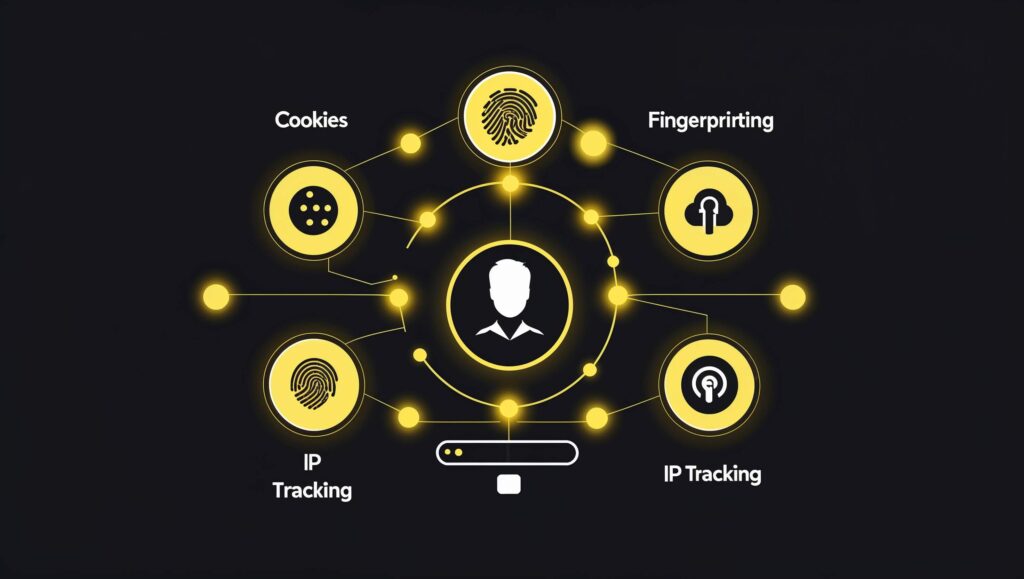
Another layer of complexity comes from how different tracking methods work together. It’s not just one system collecting your data. Multiple technologies—cookies, scripts, device identifiers, and network-level signals—combine to build a detailed picture of your behavior. Even if one method is limited or blocked, others continue to function.
This is why traditional assumptions about privacy often fail. Clearing browser history, using private mode, or avoiding logins might reduce some surface-level tracking, but they don’t stop the broader data collection ecosystem.

Understanding this complexity is important because it shifts your mindset. Online privacy isn’t a simple on/off switch—it’s a continuous process shaped by how technologies interact with your behavior. For readers just getting started, understanding online privacy basics can help clarify how personal data is collected and used across different platforms. And once you see how interconnected these systems are, you begin to understand why protecting your data requires more than just basic precautions.
The Most Common Ways Your Data Is Tracked
Most people imagine tracking as something obvious—like logging into an account or filling out a form. In reality, much of the data collection happening online requires no direct input from you at all.
One of the most familiar methods is cookies. These small files are stored in your browser to remember information like login sessions or preferences. While some cookies are essential, many are designed specifically to monitor your activity across different pages and even across entirely separate websites. This is how you might search for a product once and then see related ads everywhere afterward. To better understand what cookies are and how they work, it helps to look at how websites use them for both functionality and tracking purposes.
Another powerful method is browser fingerprinting. Instead of storing data on your device, this technique collects information about your browser and system—such as screen size, installed fonts, device type, and even time zone. When combined, these details create a unique “fingerprint” that can identify you without relying on cookies at all. If you’re curious how unique your setup is, you can test your browser fingerprint to see how easily your device can be identified online.
IP address tracking is also a fundamental layer. Every time you connect to the internet, your IP address reveals general information about your location and network. While it may not pinpoint your exact identity, it adds another piece to the overall tracking puzzle.
Then there are third-party trackers—scripts embedded within websites that send data to external companies. These trackers are often invisible to users but are responsible for much of the cross-site monitoring that fuels advertising networks and analytics platforms.
What makes these methods effective is how they overlap. Even if one form of tracking is limited, others continue working in the background. This layered approach is what makes online tracking so persistent—and so difficult to fully avoid without deeper awareness.
Cookies and Tracking Pixels
Cookies are often described as simple tools that help websites remember you—but that explanation only covers a small part of what they actually do. In practice, cookies are one of the most widely used systems for monitoring user behavior across the internet.
When you visit a website, it can place small data files in your browser to store information about your session. This might include login status, language preferences, or items in a shopping cart. These are known as first-party cookies, and they’re generally necessary for a smooth browsing experience.
The complexity begins with third-party cookies. These are created not by the website you’re visiting, but by external services embedded within it—such as advertising networks or analytics platforms. Because these same services appear on multiple websites, they can follow your activity across different domains, building a broader understanding of your interests and habits.
Tracking pixels take this a step further. These are tiny, invisible images or snippets of code embedded in web pages or emails. When they load, they quietly send information back to a server—confirming that you viewed a page, opened an email, or interacted with specific content. You won’t see them, and they don’t require any action from you.
Together, cookies and tracking pixels form a foundation for behavioral tracking. They help systems understand not just where you go, but how you interact—what you click, how long you stay, and what captures your attention. This data is then used to personalize content, refine advertising, and continuously update your digital profile in the background.
Browser Fingerprinting
While cookies rely on storing data in your browser, fingerprinting takes a different approach. Instead of placing something on your device, it gathers information from it—quietly assembling a unique profile based on your system and environment.
Every device and browser setup has small differences. These include details like screen resolution, operating system, browser version, installed fonts, language settings, time zone, and even how your system renders graphics. On their own, these details seem harmless. But when combined, they create a distinctive signature that can be surprisingly precise.
What makes fingerprinting powerful is that it doesn’t depend on traditional storage methods. You can clear cookies, switch to private browsing, or avoid logging into accounts—and still be recognizable based on your device’s characteristics. This makes it much harder to detect and control compared to more familiar tracking methods.
Another challenge is that fingerprinting operates silently. There are no visible files stored on your system, and most users have no clear indication that it’s happening. It’s designed to blend into normal web functionality, collecting data in the background without interrupting the browsing experience.
Because of this, fingerprinting is often used as a fallback when other tracking methods are limited. If cookies are blocked or restricted, fingerprinting can still provide a consistent way to identify returning users.
This approach highlights how tracking has evolved. It’s no longer dependent on a single method, but on a combination of techniques that adapt based on what is available—making online identification more persistent than many people realize.
IP Address Tracking
Every time you connect to the internet, your device is assigned an IP address—a numerical label that allows networks to identify and communicate with your connection. While it may seem purely technical, this identifier plays a quiet but important role in how your activity is observed online.
At a basic level, an IP address can reveal general information about your connection, such as your country, city, and internet service provider. Websites use this to localize content, apply regional settings, or detect unusual access patterns. But beyond these practical uses, it also becomes another layer in the broader tracking ecosystem.
Unlike cookies or browser-based identifiers, your IP address is tied to your network rather than your device alone. This means that even if you switch browsers or clear stored data, your connection can still be recognized at a network level. Over time, repeated visits from the same IP range can be associated with consistent behavior patterns—what you read, how often you return, and what kind of content you engage with.
It’s important to understand that IP tracking is rarely used in isolation. On its own, it provides a general signal. But when combined with other methods—such as cookies or fingerprinting—it helps strengthen the accuracy of identifying returning users.
There are also limitations. Many people share IP addresses through home networks or mobile carriers, and some connections change periodically. Even so, this data still contributes to the overall picture being built in the background.
In the bigger context, IP tracking acts as a foundational layer. It doesn’t define who you are by itself, but it supports other systems that aim to understand your behavior more consistently across sessions.
Third-Party Trackers
When you visit a website, you’re not always interacting with just that one site. In many cases, multiple external services are loaded in the background—often without any visible indication. These are known as third-party trackers, and they are a major reason why your activity can be monitored across different parts of the web.
Third-party trackers usually come in the form of embedded scripts, analytics tools, advertising tags, or social media integrations. While the website you’re visiting controls the content you see, these external components operate independently, sending data back to their own servers.
What makes them particularly powerful is their reach. The same tracking service can be present on hundreds or even thousands of different websites. This allows it to observe your behavior across unrelated platforms—connecting your visits into a broader pattern rather than isolated sessions.
For example, reading an article on one site, browsing products on another, and watching content elsewhere might seem like separate activities. But if those sites share the same third-party tracking systems, your interactions can be linked together behind the scenes.
These trackers collect a range of information, including pages visited, time spent, clicks, device details, and sometimes approximate location data. Over time, this builds a detailed behavioral profile that is used for analytics, personalization, and targeted advertising.
What makes third-party tracking difficult to notice is its invisibility. There are no obvious prompts or notifications explaining how many external systems are involved. Everything happens in the background, integrated into normal web functionality.
This interconnected structure is one of the key reasons online tracking feels so persistent. Even when you move between different websites, the systems observing your activity often remain the same.
How Websites Track You Across Different Sites
At a surface level, it feels like each website you visit exists independently. You open one page, then move to another, assuming your activity stays separate. In reality, many of these experiences are quietly connected through shared tracking systems operating in the background.
This cross-site tracking is largely made possible by third-party services that are embedded across multiple websites. Advertising networks, analytics providers, and content delivery tools often appear on thousands of platforms. When your browser loads these elements, they can recognize returning visitors—not necessarily by name, but through consistent signals gathered over time.
For example, visiting a product page on one website and then seeing related advertisements on a completely different platform is not a coincidence. It’s the result of shared tracking infrastructure that observes your behavior across different environments and links those interactions together.
Cookies have traditionally played a role in this process, allowing trackers to store identifiers that persist between sites. However, even as browsers begin limiting third-party cookies, other methods continue to fill the gap. Techniques like browser fingerprinting and IP-based correlation help maintain continuity, ensuring that activity remains connected even when traditional tracking is restricted.
Another important factor is how quickly this data is processed. The moment you interact with a page—scrolling, clicking, or pausing—signals can be captured and transmitted almost instantly. These signals don’t just stay within one website; they become part of a broader system that refines your profile across multiple platforms.
What makes this effective is the overlap. Different tracking methods don’t operate in isolation—they reinforce each other. Even if one signal is incomplete, others provide enough context to maintain a consistent understanding of your behavior.
This is why your online experience can feel surprisingly personalized across unrelated websites. It’s not that those sites are directly sharing your information, but rather that they rely on the same underlying systems that observe and interpret your activity as a continuous stream.
Are You Really Safe in Incognito Mode?
Incognito mode, often referred to as private browsing, is one of the most commonly misunderstood features when it comes to online privacy. Many people assume that turning it on makes their activity invisible—but that’s not what it’s designed to do.
The primary purpose of incognito mode is local privacy. It prevents your browser from saving history, cookies, and form data after the session ends. This can be useful if you’re using a shared device or want to avoid storing temporary information. Once you close the window, your browsing session is essentially wiped from that device.
However, this does not stop external tracking. Websites you visit can still observe your activity during the session. Your internet service provider can still see the domains you access. Network-level identifiers, like your IP address, remain visible. In other words, incognito mode does not make you anonymous—it simply limits what is stored locally.
Another important detail is that many tracking techniques don’t rely on stored data alone. Methods like fingerprinting analyze your browser and device characteristics in real time. This means that even without saved cookies, your session can still be recognized based on how your system behaves.
Additionally, if you log into any account while using incognito mode, your activity can still be associated with that account. The private session does not override authentication—it only controls local storage behavior.

Understanding this distinction is important. Incognito mode is a useful tool for reducing traces on your own device, but it does not prevent the broader systems that track online behavior.
In the bigger picture, it serves a specific purpose—but it’s not a complete privacy solution.
How to Reduce Online Tracking (Without Being Technical)
Completely avoiding online tracking isn’t realistic, but reducing it doesn’t require advanced skills or complicated tools. Small, consistent changes in how you browse can significantly limit how much information is collected about you.
A simple starting point is your browser. Most modern browsers include built-in privacy settings that can block third-party cookies and limit cross-site tracking. Enabling these options takes only a few clicks but immediately reduces how easily your activity can be followed across different websites.
You can also make use of privacy-focused browser extensions. Tools that block trackers and unwanted scripts help prevent many third-party services from loading in the first place. This not only improves privacy but can also make pages load faster and feel cleaner.
Another effective habit is being mindful of logins. Staying signed in to multiple accounts—especially on large platforms—makes it easier for activity to be connected across sites. Logging out when you’re not actively using a service, or using separate browsers for different purposes, helps keep your activity more isolated.
Using a trusted VPN can also reduce certain types of tracking by masking your IP address. While it doesn’t stop all forms of monitoring, it adds a useful layer that prevents your real network identity from being directly exposed to every site you visit. Using a trusted VPN can also reduce certain types of tracking by masking your IP address, and for beginners, using a VPN for added privacy is one of the easiest ways to protect your connection online.
Regularly clearing cookies and site data is another simple step. While it won’t eliminate tracking, it resets many identifiers that websites rely on, making long-term tracking less consistent.
Most importantly, pay attention to permissions and prompts. Many websites ask for access to location, notifications, or additional data. Taking a moment to review these requests—and denying what isn’t necessary—helps limit how much information is shared in the first place.
These steps don’t require technical expertise. If you want to go further, exploring simple ways to improve your online privacy can help you build stronger habits for long-term protection. They’re practical habits that, when combined, make it much harder for tracking systems to build a detailed and continuous profile of your activity.
Final Thoughts: Awareness Is Your First Layer of Protection
Online tracking isn’t always obvious, and that’s what makes it so effective. It operates quietly, blending into everyday browsing in a way that most users never notice. By the time you start thinking about privacy, much of your data has already been collected and analyzed.
But this doesn’t mean you’re powerless. The most important shift is awareness. Once you understand how tracking works—how different methods connect, reinforce each other, and operate in the background—you begin to see the internet differently.
Instead of assuming privacy by default, you start recognizing where your data is being shared, how your activity is interpreted, and why certain content feels personalized. This awareness naturally leads to better decisions—whether it’s adjusting browser settings, limiting unnecessary permissions, or simply being more intentional about how you interact online.
It’s also important to approach privacy with realistic expectations. There is no single tool or setting that can eliminate tracking. What matters is reducing exposure, staying informed, and maintaining control where possible.
Over time, these small decisions add up. They don’t just protect your data—they change how much influence tracking systems have over your online experience.
In the end, privacy isn’t about disappearing from the internet. It’s about understanding it well enough to navigate it on your own terms.
Using a trusted VPN can reduce certain types of tracking by masking your IP address. While it doesn’t stop all forms of monitoring, it adds a useful layer that prevents your real network identity from being directly exposed to every site you visit. For beginners, using a VPN for added privacy is one of the easiest ways to protect your connection online.